What ADze does with Zoom
- For every calendar event and every booking with the location “Zoom”, ADze creates a meeting in your Zoom account. The join link is in the appointment, in the confirmation to the guest and in the calendar file.
- If you move the appointment, or the guest moves it, the meeting gets the new time.
- If you delete the appointment, someone cancels or you choose another location, ADze deletes the meeting in Zoom.
- ADze does nothing more. ADze does not read existing meetings, recordings, participant lists or chat.
Requirements
- An ADze account in which your organisation has not switched Zoom off.
- A Zoom account of your own. A free one is enough; meetings are then limited by Zoom's rules.
Adding
- Sign in to ADze.
- At the bottom of the sidebar, click your name and open the “Connections” tab.
- On the “Zoom” card, click “Connect to Zoom”.
- Sign in to Zoom if needed and click “Allow”. ADze asks for exactly these permissions: create, change and delete meetings, and read your Zoom ID once.
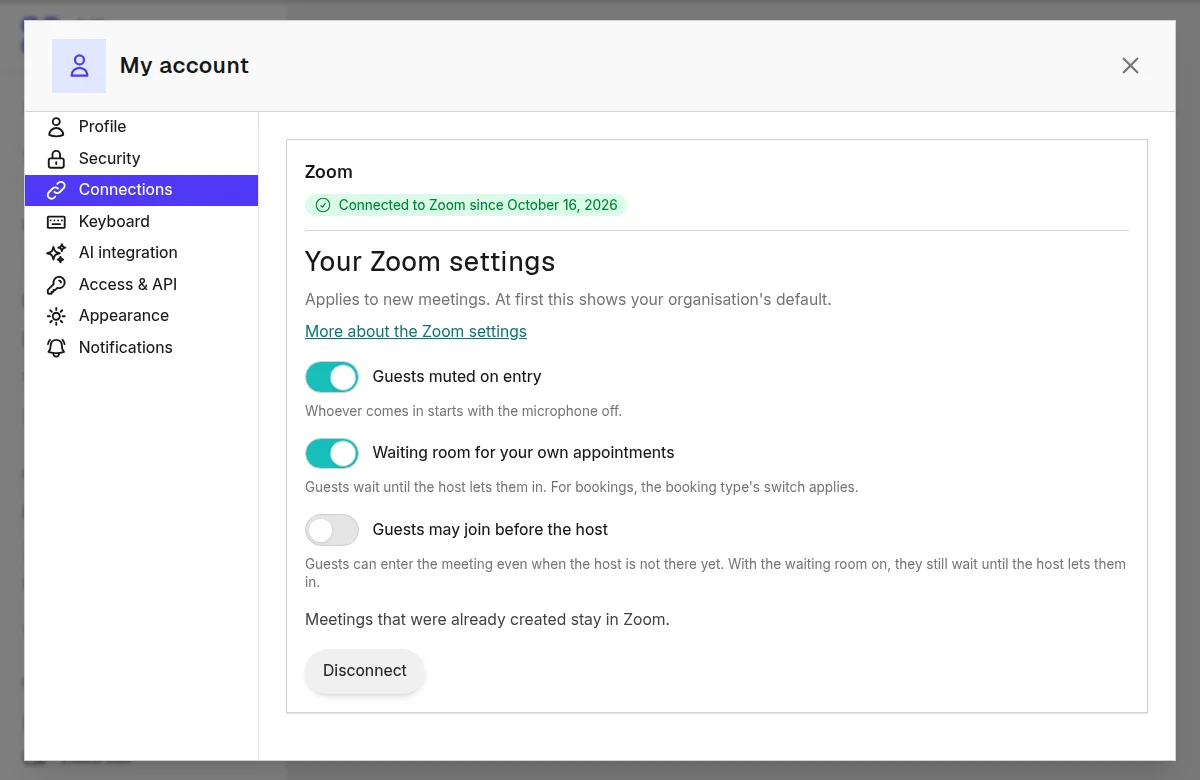
- You land back in ADze. The card shows “Connected to Zoom since” and the date.
If you added the app in Zoom through “Add” in the Marketplace, ADze shows you a note to finish connecting with the button.
Using
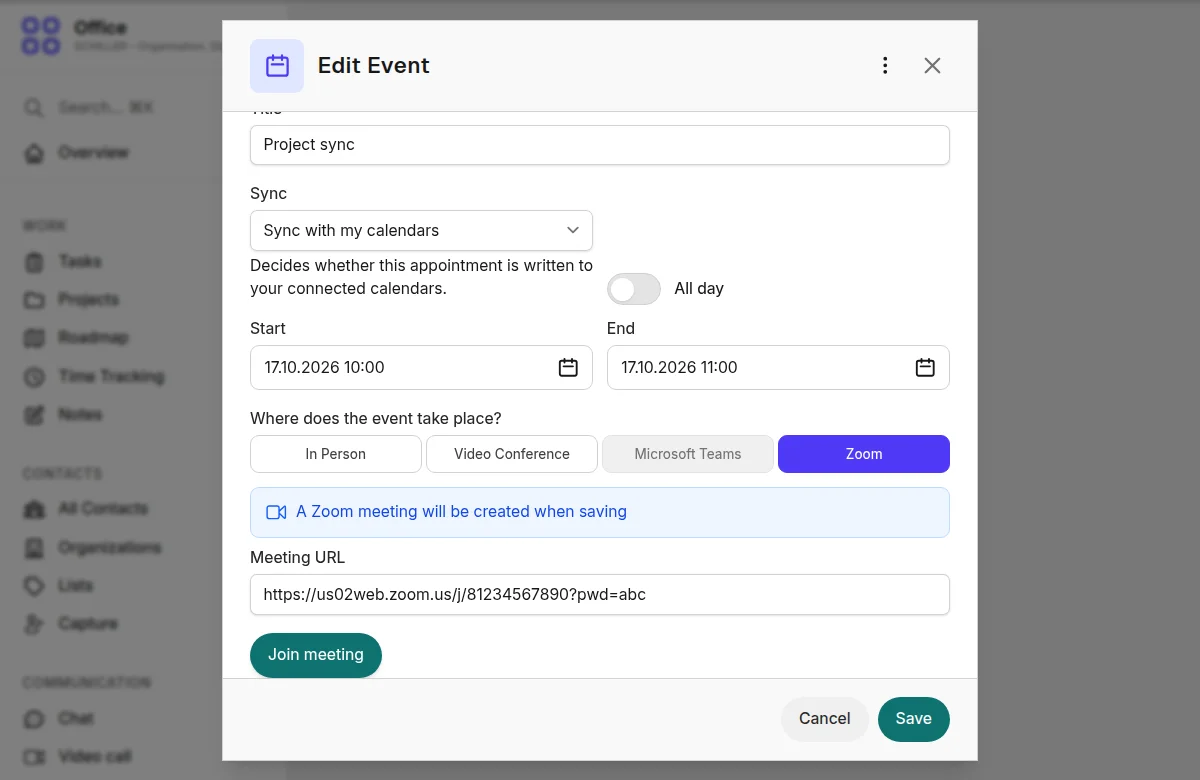
- Calendar event: New Event, choose “Zoom” under “Where does the event take place?”, save. The link appears in the appointment, with the button “Join meeting”. Series and all-day events do not work with Zoom.
- Booking pages: In the booking type, tick “Zoom” in the “Place” tab. Every booking gets its own meeting. The name of the booking type goes to Zoom as the topic, never the guest's name.
- Settings: On the Zoom card, “Guests muted on entry”, “Waiting room for your own appointments” and “Guests may join before the host”. The passcode is always on. New meetings follow your choice.
- If Zoom does not work once, the appointment gets a video room from ADze, and you get an email about it.
Removing
- In ADze: “Connections” tab, “Zoom” card, “Disconnect”. ADze revokes its access at Zoom.
- In Zoom: in the Zoom App Marketplace under “Manage”, “Added Apps”, click “Remove” next to ADze. ADze learns this from Zoom and deletes the connection by itself.
- What happens afterwards: ADze deletes your access keys and your Zoom ID. New appointments no longer get a Zoom meeting, and the location “Zoom” is locked. Meetings that already exist in Zoom stay in your Zoom account until you delete them there. Appointments in ADze keep their link. If your ADze account is deleted, ADze revokes the access as well and deletes the keys.
Troubleshooting
- The location “Zoom” is locked: First connect your Zoom account. If it is still locked, your organisation has switched Zoom off.
- Message “The Zoom app is missing a permission”: Contact us.
- Message “Please start connecting here”: Click “Connect to Zoom”.
- The meeting has the old time: Save the appointment once more. If Zoom has a disruption, ADze tries again by itself.
Your data
At your explicit request, ADze connects a Zoom account of your own in order to create, move and delete meetings for appointments with the location “Zoom”. For each meeting, ADze sends Zoom the topic (for bookings the name of the booking type, for your own appointments the title you entered), start, duration, time zone and the meeting settings (waiting room, mute on entry, join before host). Names and email addresses of guests are not sent to Zoom. When connecting, ADze reads the Zoom ID of the account once. ADze stores the access keys (encrypted), the Zoom ID, the time of the connection and, for each appointment, the meeting ID and the join link. The access keys and the Zoom ID are deleted and the access at Zoom is revoked as soon as the connection is disconnected, the app is removed in Zoom or the user account is deleted. The meeting ID and link are deleted together with the appointment. Meetings created in Zoom stay in the Zoom account until they are deleted there. Data from Zoom is not sold, not used for advertising and not used to train AI models. The connection is only made after you activate it and can be ended at any time. The meetings themselves are governed by the contract between you and Zoom.
Service provider: Zoom Communications, Inc., 55 Almaden Blvd., Suite 600, San Jose, CA 95113, USA. Basis for transfers to third countries: Data Privacy Framework (DPF). Legal basis: performance of a contract (Art. 6(1)(b) GDPR). Your rights: see the section “Rights of data subjects” of the privacy policy; send requests to the address under “Controller”.
The German privacy policy is binding.
Help and contact
Write to us through the contact page or at the address in the legal notice. We usually reply within one working day.
- Terms of use for the Zoom integration
- Privacy policy (Zoom section, German only)
